Binance Complete Beginner Guide 2026: Everything You Need to Know
The ultimate beginner's guide to Binance. Account setup, trading, security, and tips for new crypto traders.
Welcome to Binance
Binance is the world’s largest cryptocurrency exchange. This guide covers everything you need to get started.
Step 1: Create Your Account
Sign up with referral code RATE20 for 20% off all trading fees.
- Go to the Binance registration page
- Enter email and password
- Verify your email
- Complete KYC (identity verification)
- Enable 2FA (two-factor authentication)
Step 2: Understand the Interface
Binance Lite vs Pro
- Lite: Simple buy/sell interface for beginners
- Pro: Full trading view with charts and order book
Start with Lite, switch to Pro when comfortable.
Key Sections
- Dashboard: Account overview and balances
- Trade: Spot, margin, and futures trading
- Earn: Staking and savings products
- Wallet: Deposit, withdraw, transfer funds
Step 3: Fund Your Account
Recommended: Buy USDT via P2P with local currency, then trade on spot.
Step 4: Make Your First Trade
- Go to Trade → Spot
- Search for a trading pair (e.g., BTC/USDT)
- Choose Limit order (lower fees)
- Enter amount
- Click Buy
Step 5: Secure Your Account
- Enable Google Authenticator 2FA
- Set anti-phishing code
- Enable withdrawal whitelist
- Use a unique, strong password
Essential Tips for Beginners
- Start small — invest only what you can afford to lose
- Learn first — understand what you’re buying before trading
- Don’t chase pumps — buying after big price increases is risky
- Use limit orders — lower fees than market orders
- Enable all discounts — referral code + BNB payment
Get 20% Off Binance Trading Fees with RATE20
New to Binance? Open the official signup page with RATE20 already applied for a 20% trading-fee discount. You do not need to copy or type the code. Review the referral details before completing registration.
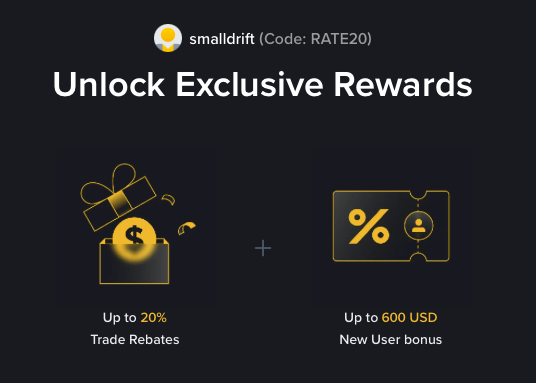
- Referral code: RATE20, pre-applied by this link
- Fee discount: 20%, shown on the Binance signup screen
- Additional rewards: Check Binance for current promotions and regional availability
Be wary of unofficial referral offers promising benefits they cannot show. The Binance signup screen lets you check the code and fee discount directly.
Compare Binance fees and available discounts →
SmallDrift may earn a commission when you sign up through this link. Trading involves risk, including loss of capital.
Related Articles
Explore Related Guides
Daily Crypto Market News
Follow Bitcoin price moves, major altcoins, and the events shaping the market.
Bitcoin ETF Flows Guide
Understand ETF inflows and outflows, and how to read them alongside price action.
Binance Fee Calculator
Learn how to estimate trading costs with referral and BNB discounts.
Verified Binance Referral Guide
See how RATE20 is applied and what to check on the Binance signup screen.