How to Register on Binance with Referral Code (2026 Guide)
Step-by-step tutorial on how to register a Binance account with referral code RATE20 for a permanent 20% trading fee discount.
Registration Process with Referral Code
This guide walks you through every step of creating a Binance account with the maximum fee discount applied.
Referral Code: RATE20 — enter this during registration for 20% off all trading fees.
Step 1: Open Registration Page
Navigate to the Binance website and click Register or Sign Up.
You’ll see a registration form with these fields:
- Email or Phone Number
- Password
- Referral ID (this is where you enter the code)
Step 2: Enter Your Details
Email Registration (Recommended):
- Enter a valid email address
- Create a strong password (12+ characters, mixed case, numbers, symbols)
- In the Referral ID field, type RATE20
Phone Registration:
- Select your country code
- Enter your phone number
- Create a password
- Enter referral code RATE20
Double-check the referral ID before proceeding. If the field is empty or has a different code, your account won’t get the 20% discount.
Step 3: Email/Phone Verification
Binance sends a 6-digit verification code:
- Email: Check inbox (and spam/junk folder)
- Phone: SMS delivery within 1-2 minutes
Enter the code within the time limit (usually 10-30 minutes).
If you don’t receive the code:
- Check spam/junk/promotions folders
- Wait 60 seconds and click “Resend”
- Try a different email provider if issues persist
- Ensure your phone can receive international SMS
Step 4: KYC Identity Verification
Required for trading, depositing, and withdrawing.
Documents accepted:
- Passport (highest success rate)
- Driver’s license
- National ID card
The process:
- Go to Account → Identification
- Select your country
- Choose document type
- Upload clear photos (front and back for ID cards)
- Complete face verification (follow on-screen instructions)
Tips for fast approval:
- Good lighting, no shadows on the document
- All text clearly readable
- No glare on laminated cards
- Neutral expression for selfie
- Stable internet for video verification
Typical approval time: 5-15 minutes (automated). Up to 48 hours during peak periods.
Step 5: Secure Your Account
Enable Google Authenticator:
- Download Google Authenticator app
- Go to Security → Authenticator App
- Scan QR code
- Write down backup key on paper (critical for recovery)
- Enter 6-digit code to confirm
Set Anti-Phishing Code:
- Go to Security → Anti-Phishing Code
- Create a memorable code
- All real Binance emails will include this code
Enable Withdrawal Whitelist:
- Security → Withdrawal Whitelist
- Toggle on
- Add your trusted addresses
Step 6: Verify Your Fee Discount
After registration, confirm the referral was applied:
- Go to Account → Fee Rate
- Spot trading fee should show 0.0800% (not 0.1000%)
- If it shows 0.1000%, the referral wasn’t applied
What if the referral wasn’t applied?
Unfortunately, you cannot add a referral code after registration. Your options:
- Create a new account with a different email
- The 10 minutes to re-register saves you hundreds to thousands in fees over your account’s lifetime
Step 7: Maximize Your Discount
Buy BNB:
- Go to Trade → Spot → BNB/USDT
- Buy $20-50 worth of BNB
Enable BNB Fee Payment:
- Dashboard → Settings
- Toggle on “Use BNB for Fees”
- Spot fee drops from 0.08% to ~0.06%
Registration Checklist
| Step | Action | Status |
|---|---|---|
| 1 | Referral code RATE20 entered | ☐ |
| 2 | Email/phone verified | ☐ |
| 3 | KYC approved | ☐ |
| 4 | Google Authenticator enabled | ☐ |
| 5 | 2FA backup key saved on paper | ☐ |
| 6 | Anti-phishing code set | ☐ |
| 7 | Fee rate shows 0.08% | ☐ |
| 8 | BNB purchased | ☐ |
| 9 | BNB fee payment enabled | ☐ |
Complete all 9 steps for maximum security and minimum fees. Total time: 15-20 minutes. Lifetime benefit: 20-40% lower fees on every trade.
Get 20% Off Binance Trading Fees with RATE20
New to Binance? Open the official signup page with RATE20 already applied for a 20% trading-fee discount. You do not need to copy or type the code. Review the referral details before completing registration.
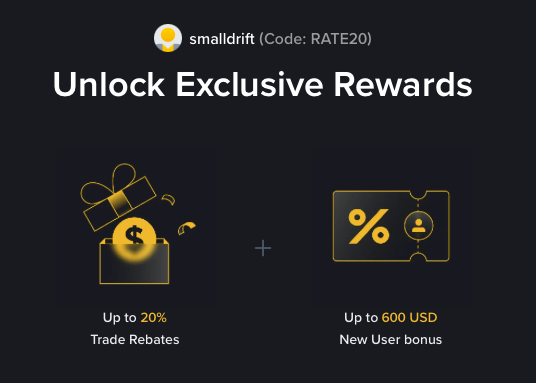
- Referral code: RATE20, pre-applied by this link
- Fee discount: 20%, shown on the Binance signup screen
- Additional rewards: Check Binance for current promotions and regional availability
Be wary of unofficial referral offers promising benefits they cannot show. The Binance signup screen lets you check the code and fee discount directly.
Compare Binance fees and available discounts →
SmallDrift may earn a commission when you sign up through this link. Trading involves risk, including loss of capital.
Related Articles
Explore Related Guides
Daily Crypto Market News
Follow Bitcoin price moves, major altcoins, and the events shaping the market.
Bitcoin ETF Flows Guide
Understand ETF inflows and outflows, and how to read them alongside price action.
Binance Fee Calculator
Learn how to estimate trading costs with referral and BNB discounts.
Verified Binance Referral Guide
See how RATE20 is applied and what to check on the Binance signup screen.