How to Share Your Binance Referral Link & Earn Commission
Step-by-step guide to finding, customizing, and sharing your Binance referral link. Best practices for maximizing signups and earning commissions.
Finding Your Binance Referral Link
Step 1: Access the Referral Page
- Log into Binance
- Click your profile icon → Referral
- Or navigate to Account → Referral in the menu
Step 2: Get Your Link and Code
You’ll see:
- Referral Link: A URL that pre-fills your code when clicked
- Referral ID: Your alphanumeric code (e.g., RATE20)
- QR Code: For in-person sharing
Step 3: Set Your Commission Split
Before sharing, configure how much commission you keep vs. how much discount the new user gets:
| Your Commission | User’s Discount | Total |
|---|---|---|
| 20% | 0% | 20% |
| 10% | 10% | 20% |
| 0% | 20% | 20% |
Recommendation: Give users the maximum 20% discount. This makes your code the most attractive, driving more signups and higher total volume.
Best Places to Share
Social Media
- Twitter/X: Share with trading tips, market analysis
- Reddit: In relevant crypto subreddits (follow self-promotion rules)
- YouTube: Include in video descriptions and tutorials
- TikTok: Short crypto education videos
Content Platforms
- Blog posts: SEO-optimized articles about Binance
- Medium: Crypto guides and exchange reviews
- Substack: Newsletter with trading insights
Communities
- Discord servers: Your own or others (with permission)
- Telegram groups: Crypto trading communities
Direct Sharing
- Friends and family: Personal recommendation
- QR code: At meetups or events
Do’s and Don’ts
DO:
- Provide genuine value alongside your referral link
- Disclose the referral relationship (transparency builds trust)
- Explain the benefit to the user (they get 20% off)
- Create helpful content that naturally incorporates the referral
DON’T:
- Spam your link everywhere
- Hide the referral nature
- Make false claims about bonuses
- Pressure people to sign up
Tracking and Optimization
In the Binance Referral dashboard, you can see:
- Total number of referred users
- Active vs inactive referred users
- Daily/weekly/monthly commission earned
- Commission breakdown by user
Focus on channels that bring active traders, not just signups. One active futures trader generates more commission than 100 dormant accounts.
Your Own Account First
Before sharing your referral with others, make sure your own account is set up with maximum savings. Register with code RATE20 for 20% off your own trading fees. Then build on that by sharing your personal referral code.
Get 20% Off Binance Trading Fees with RATE20
New to Binance? Open the official signup page with RATE20 already applied for a 20% trading-fee discount. You do not need to copy or type the code. Review the referral details before completing registration.
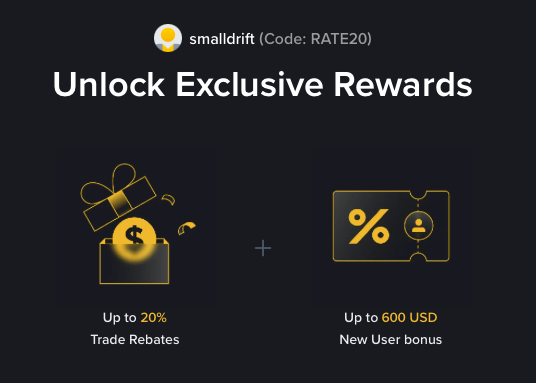
- Referral code: RATE20, pre-applied by this link
- Fee discount: 20%, shown on the Binance signup screen
- Additional rewards: Check Binance for current promotions and regional availability
Be wary of unofficial referral offers promising benefits they cannot show. The Binance signup screen lets you check the code and fee discount directly.
Compare Binance fees and available discounts →
SmallDrift may earn a commission when you sign up through this link. Trading involves risk, including loss of capital.
Related Articles
Explore Related Guides
Daily Crypto Market News
Follow Bitcoin price moves, major altcoins, and the events shaping the market.
Bitcoin ETF Flows Guide
Understand ETF inflows and outflows, and how to read them alongside price action.
Binance Fee Calculator
Learn how to estimate trading costs with referral and BNB discounts.
Verified Binance Referral Guide
See how RATE20 is applied and what to check on the Binance signup screen.